

Spruce sign
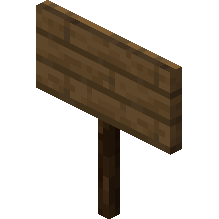
How to Craft / Obtain

Uses for this Item (Recipes Including This)
This item is not used as an ingredient in any known crafting recipes.
About
A sign is a non-solid block that can display text and can be placed on either the top or the side of other blocks. Spruce signs naturally generate in taiga village houses as part of a chair, though the naturally generated signs do not display any text. Players can break signs with any tool or without one, although using an axe provides the fastest breaking speed. Furthermore, a sign will immediately break and drop itself as an item if the block it is attached to is moved, removed, or destroyed by any means.
Players can use signs to display custom text, label storage areas, communicate information to other players, or note specific areas of interest. Since signs are completely unaffected by water and lava, they are frequently utilized to control the flow of these fluids in various builds. Additionally, overworld sign variants can serve as a reliable fuel source in furnaces, successfully smelting one item per sign. Nether sign variants, such as crimson and warped signs, cannot be utilized as fuel in a furnace.
When placing a sign, players can attach it to the top or side of other blocks, including semi-solid and non-solid blocks like fences, trapdoors, and even other signs. Signs placed on top of a block stand on a short post and face toward the player in one of sixteen possible directions, whereas signs placed on the sides of blocks simply float in place. Placing a sign opens an editor interface resembling a magnified view of the sign where up to four lines of text can be entered. Players can also add text to the back side of the sign by interacting with that side after editing the front.
The text displayed on signs can be customized and enhanced through several different mechanics and items. Using a dye on a sign changes the text color across all four lines, while using a glow ink sac makes the text glow and display a distinct outline unaffected by ambient lighting. Players can also apply a honeycomb to a sign to wax it, preventing the text from being edited by any player unless the sign is broken or modified using commands. In Bedrock Edition, formatting codes with section signs can apply decorative effects, and inappropriate words are filtered into hashtags if the profanity filter is enabled.
Signs are completely non-solid and possess no collision boxes, allowing players, mobs, and items to move freely through them while other blocks can be attached to any of their edges. Players can continue to edit placed signs at any time by interacting with them to reopen the message graphical user interface. A dyed sign facing east or west appears more saturated and bright than one facing north or south due to the game engine utilizing side lighting. Finally, in Java Edition, advanced creators can utilize text components and commands like data merge block to incorporate complex formatting, click events, and scoreboard values directly onto the sign.